Quotes page enhanced to display important dates
Minor Upgrade
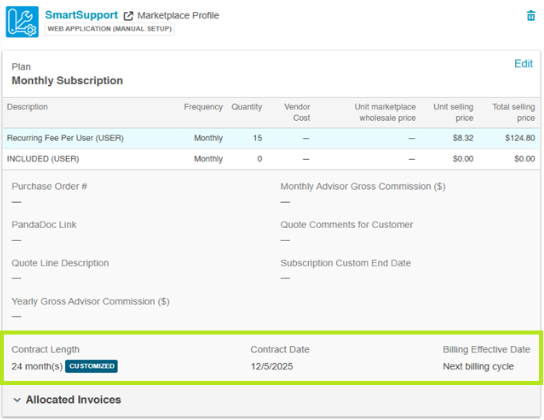
The Quotes page UI is enhanced to prominently display the important dates such as Request service and Billing effective dates when applied to any product.
Previously to view these dates you had to click the Edit Product Details button for each product. With this update, you can now see the required date information on the read-only card of the product on the quote page provided the dates are applied and updated.
To apply or update the required dates:
- On the Quotes page, click Edit Product Details for the required product and set the required dates in the Date Controls section. The saved dates are displayed on the read-only card of that product on the main page.
Key highlights
- Enhanced efficiency, accuracy and quicker turnaround time for quote fulfillment.
- Reduced errors and risk leading to higher customer satisfaction and protection against revenue risk.
Feature enablement
This feature is not enabled by default. Contact your AppDirect technical representative to request it.
Setting enablement
No setting enablement is required.
Documentation
Documentation will be updated with the release.
Was this page helpful?
Tell us more…
Help us improve our content. Responses are anonymous.
Thanks
We appreciate your feedback!